
Creating irrigation groups for sub-organizations and marking staff for operations
Version 0.5.1 closes the gaps that became visible with organizations and permissions in 0.5.0. An irrigation group can now be created for a specific sub-organization, and the profile records who may be assigned to operations. On top of that come several fixes, among them the irrigation state after a completed operation and the error messages shown in the forms.

Cedrik Hoffmann
Lead Developer & Project Lead
With 0.5.0, organizations and a permission system of its own arrived in the application. Everyday use showed that in a few places the matching controls were still missing: an irrigation group inevitably ended up in the organization of the person creating it, and when a request failed because of that, the message did not say why. Version 0.5.1 covers those points and fixes several further bugs.
New Features
Choosing the organization when creating an irrigation group
An irrigation group and its trees have to belong to the same organization. Which organization a new group ended up in was previously determined solely by the person creating it. Anyone working from a parent organization who wanted to create a group for a unit below it selected the right trees on the map and still could not save the group.
The creation form therefore has a field for the organization. Only organizations in which the person holds the permission to create irrigation groups are offered, and their own is preselected. If only one organization is eligible anyway, the field stays hidden and the workflow is unchanged.
On the map, all visible trees remain drawn, but only those of the chosen organization can be selected. The others are dimmed. Clicking one of them asks whether the group should be created in that tree’s organization instead. If the organization changes in the form, trees of other organizations that were already marked leave the selection.
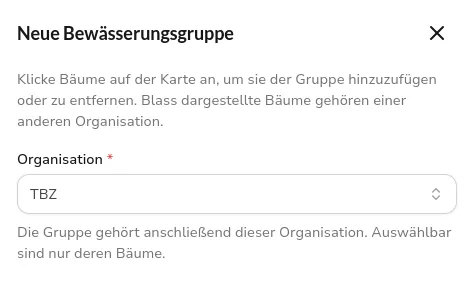 Creation form of a new irrigation group with the organization field set to TBZ and the note that dimmed trees belong to a different organization
Marking staff as selectable for operations planning
In the form for an irrigation schedule, the field for linked staff offered every user account, including people who are not eligible for an operation at all. The driving license classes from the profile are not sufficient as a criterion, because someone can have a license on record and still not be meant for assignment.
The profile in the staff management therefore carries a switch for selectability in operations planning, maintained in the same card as availability, driving license classes, phone number, and personnel number. The forms for creating and editing an irrigation schedule then offer only marked people. Existing accounts are marked after the update; anyone who should not be assigned is deselected deliberately. An assignment that has already been saved is unaffected, and the schedule’s license check does not report an error because of it.
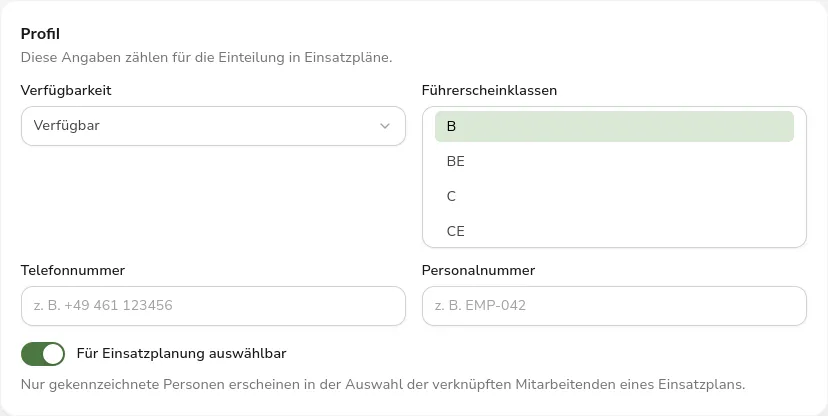 Profile card in the staff management with availability, driving license classes, phone number, personnel number, and the enabled switch for selectability in operations planning
Fixed Bugs
Irrigation state after an operation
After an irrigation schedule was completed, the irrigation state of the assigned groups stayed at the old value derived from the sensor data. The application set only the date of the last irrigation. Groups and their trees are now set to “Just irrigated” on completion. After 24 hours the state falls back to the sensor-derived value, while the date of the last irrigation is kept. Starting, canceling, or reporting a schedule as not completed still leaves the state untouched.
Stale views after a change
After a change, detail pages and lists sometimes kept showing the old values until the page was reloaded. It was most obvious when the status of an irrigation schedule changed. The application did not reload the resulting change to groups and trees at all. After deleting or archiving, the list still contained the removed entry as well. Both are fixed, and a change now also refreshes the views of the groups and trees it touches.
Vehicles and error messages
Vehicles could no longer be saved. The numeric fields for dimensions, weight, and water tank were sent to the interface as text and rejected there. Instead of a message in the form, the application’s error page appeared, and the entered data was lost. The fields are now sent as numbers, the decimal comma keeps working, and a rejected save shows up as a message in the form.
The messages themselves were misleading as well. When trees of a different organization were selected for a group, the application reported that the record already existed or had been changed in the meantime. It then showed the same sentence a second time as the supposed answer from the server. The answer now states specifically what does not match, and the form shows that message instead of the generic notice. Rejected input also occasionally led to a fresh sign-in, because the interface treated that answer as an expired session. That now happens only when the sign-in has actually expired.
Operations planning and staff
On the detail page of an irrigation schedule, the field for assigned staff listed every user account rather than the people assigned to the schedule. The page now shows only the assigned people.
On the operations board, people without the edit permission could tick suggestion cards, and the schedule cards looked draggable although no action followed. Without the matching permission, the cards are now for display only.
In the staff management, the list and the detail header always showed the monogram, even when a profile picture was on record. Both now show the picture, and the monogram only for profiles without one.
Outlook
The selection field for the organization exists only for the irrigation group so far. It is still missing for trees, sensors, vehicles, and irrigation schedules, as is the option to move an existing group to a different organization afterwards. Both will follow in upcoming versions. The next larger step is sharing individual resources with sub-organizations, so that a contracted company can look after a set of assets without it being transferred to them.
Feedback and bug reports are always welcome on GitHub.
Found an error or have feedback on this release? Create an issue →