
A handbook inside the application, plugins and per-organization defaults
Version 0.7.0 moves the user handbook into the application itself: every page carries a button that opens the matching chapter, and the complete handbook is also available as a PDF. Alongside it, external systems can be connected as plugins, every organization sets its own operational defaults down to the map viewport, and the lists for trees, groups, vehicles and sensors have been rebuilt with search, filters and sorting.

Cedrik Hoffmann
Lead Developer & Project Lead
Anyone wanting to learn Green Ecolution so far had to work the interface out on their own or ask a colleague. Version 0.7.0 brings a user handbook that is reachable from every page. Alongside it stand two additions to administration: external systems can be connected as plugins, and every organization sets its own operational defaults instead of taking them instance-wide. The lists for trees, irrigation groups, vehicles and sensors have been rebuilt as well.
Release Highlight
The handbook inside the application
The handbook holds 19 chapters in six parts, from the first steps through the map, trees and irrigation schedules to sensors and permission management.
A question mark in the header at the top right leads straight into the chapter belonging to the page currently open; for pages without a chapter of their own, the overview opens instead. From there the handbook can be searched across all chapters, and anyone who prefers to read it in one go or to print something downloads the complete handbook as a PDF.
The handbook requires no login and does not follow roles. Whoever wants to know what the application does before a task is assigned at all can read up on it beforehand.
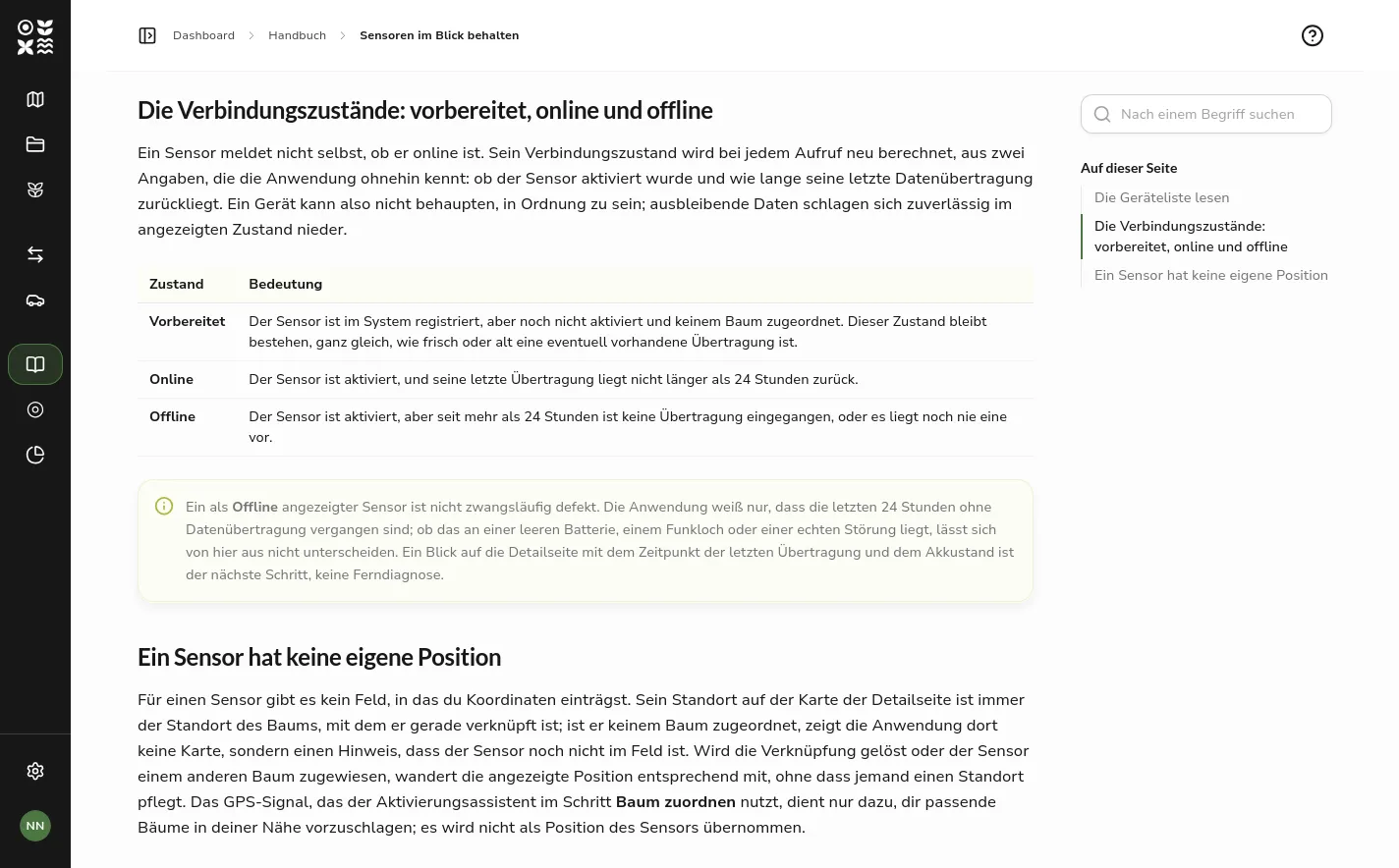 A handbook chapter inside the application, with the search field and the chapter outline in the right-hand column
New Features
Plugins
Green Ecolution can be extended with external systems without those systems becoming part of the application. The obvious case is a municipal tree register that feeds in its stock continuously.
A plugin does not register itself; it is installed in the settings, the way a vehicle or a role is created. In doing so it receives an API key of its own, which lets it create, update and delete trees. The key appears exactly once in plain text, only its hash is stored, and it can be rotated at any time from the detail page, for instance when a plugin changes operator.
A plugin may also bring along an interface of its own. Green Ecolution embeds it in an isolated frame and hands it the display name, the interface language and the plugin’s slug, but no access to the login credentials. What a plugin itself may do and who may open its view are two separate permission sets: the first can only be granted up to one’s own permissions, the second decides independently which group of people the view is released to. The view of a plugin can therefore also be opened by someone holding no permission to manage plugins.
The feature can be switched off per instance and appears in the settings navigation only when it is on and one’s own role allows managing plugins.
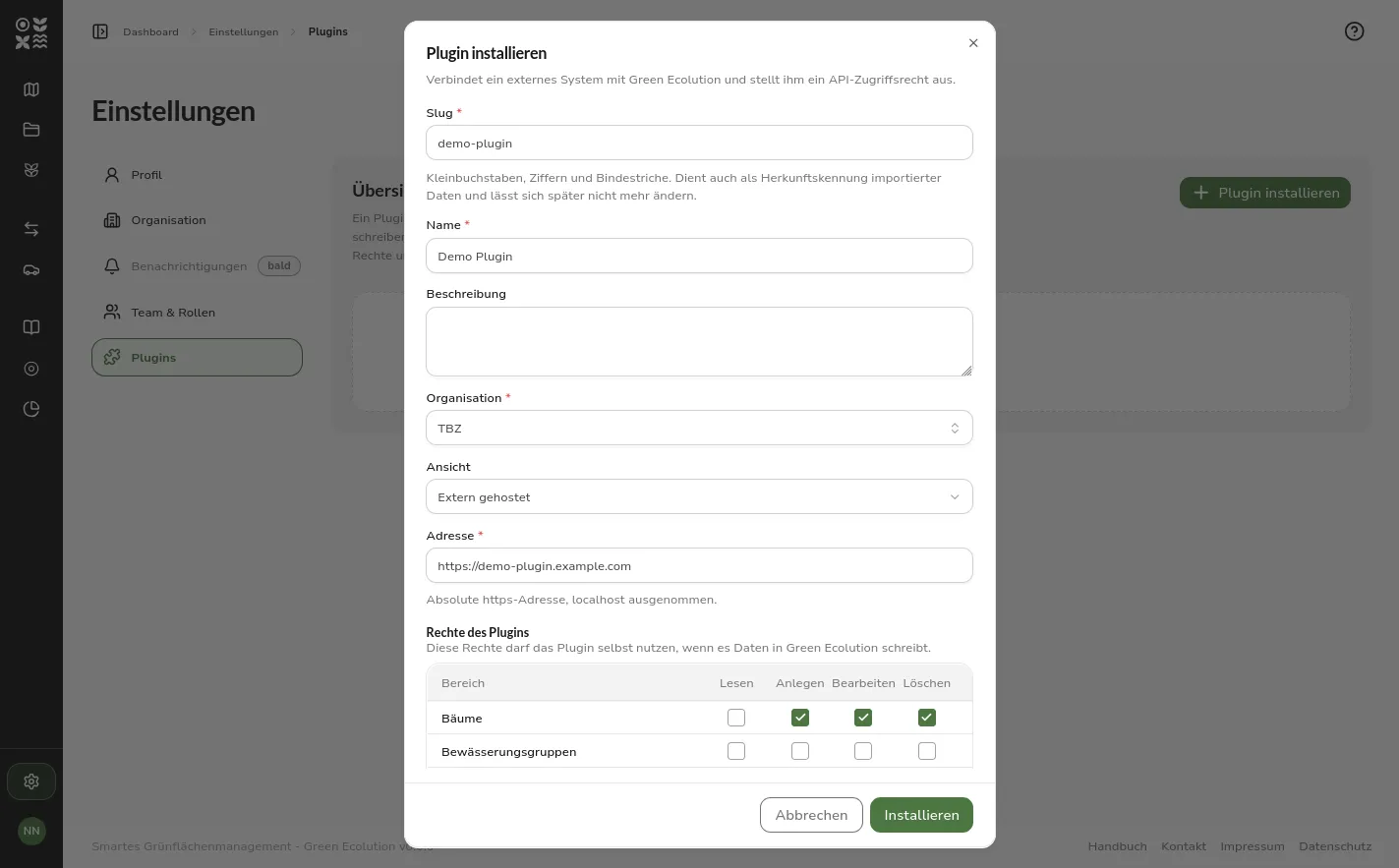 The plugin install dialog with slug, name, organization, an externally hosted address and the permission matrix of the plugin itself
Operational defaults per organization
Values that steer day-to-day operation used to sit in the configuration of the instance and therefore applied to everyone alike. An instance serving several municipalities could not tell them apart.
The detail view of an organization now carries an Operational defaults section. It holds the water demand per tree, which feeds the demand calculation of every irrigation group and thereby decides how many groups a route plan puts into one run. Beside it stands the just-watered duration: it decides how long a tree counts as freshly watered after a finished irrigation schedule.
The values are inherited downward. An organization that sets none of its own takes the one from its parent, up the tree to the instance default. A badge next to the value names its origin, and below it stands when it was last changed and by whom. An inherited value simply reads as a number, because there is nothing to type while it comes from elsewhere; only Set own value turns it into an input field, and Inherit again discards it. Conversely, an organization can deny its sub-units the right to deviate; the values of the denying organization then apply throughout its branch.
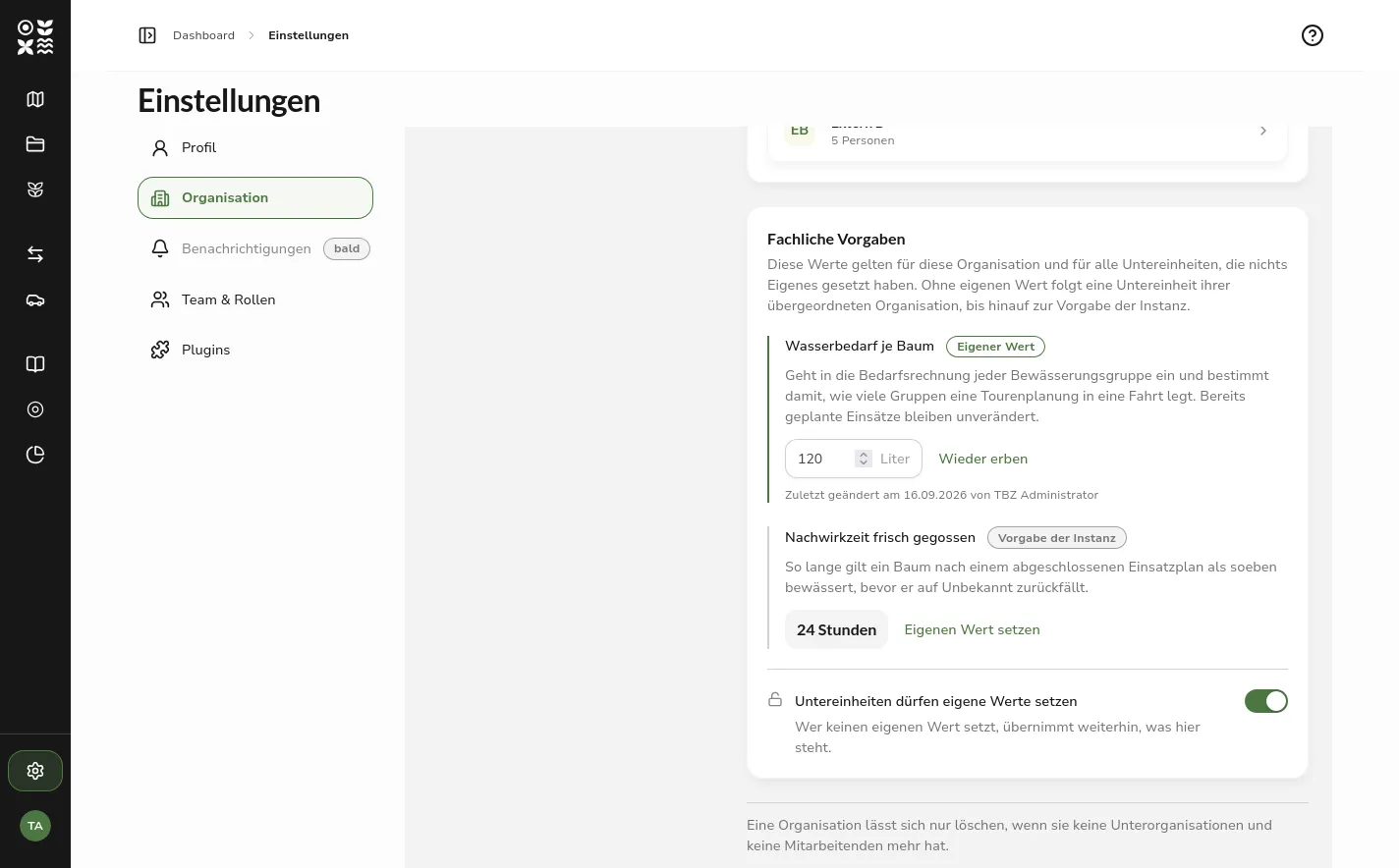 The operational defaults section with the water demand per tree as an own value and the just-watered duration as the instance default
The map viewport of an organization
The third value in that section is the map viewport. It decides where the map opens for the staff of an organization and which area it releases at all. Until now both came instance-wide from the configuration and showed everyone the same place.
An extent is hard to describe in four coordinate fields, so the viewport is framed on a map: pan and zoom until the visible extent matches the working area, drag the marker to where the map should open, then apply the extent. Two fields below bound the zoom levels from either end.
Not every organization works in a delimited area. A switch therefore lifts the boundary entirely; what remains is the centre alone, because the map still has to open somewhere. The change takes effect the next time a map is opened. Whoever already has a map in front of them and has panned it keeps their position, and a link carrying coordinates still leads where it points.
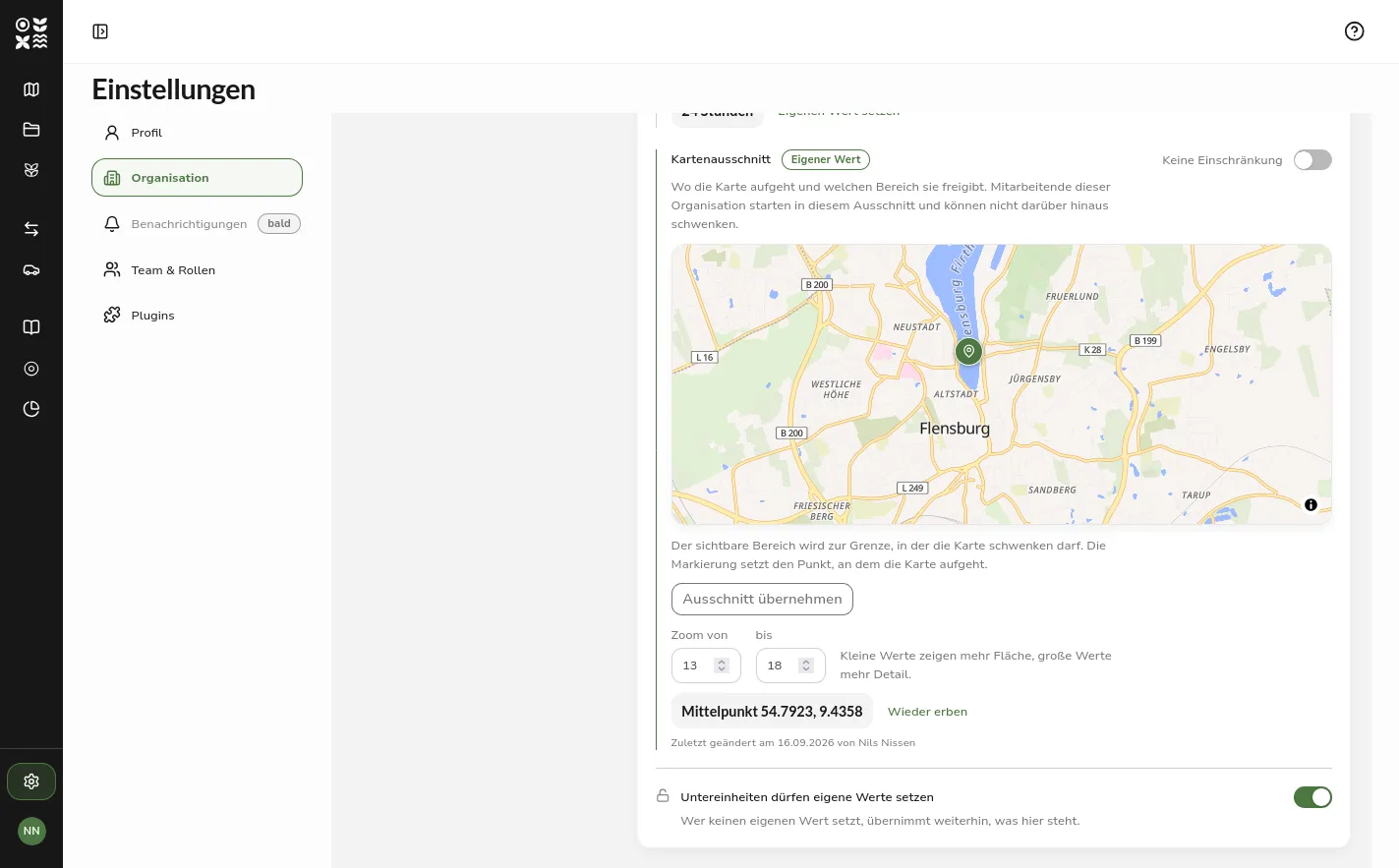 The map viewport in its editable state with a pannable map, the centre marker, the zoom range and the no-restriction switch
Planned plantings
A planting year was not allowed to lie in the future. A planting already decided could therefore only be recorded once the tree was in the ground. Future planting years are now accepted, and the master data marks such a tree as not yet planted.
Two things follow, and the application explains both on the spot: the tree stays without an irrigation status, because there are no roots yet for soil moisture to be measured around, and it cannot carry a sensor. As soon as the planting year is reached, the marking disappears by itself.
The input field also accepts shorthand. Leaving the field turns 25 into 2025, and the field then shows the full year so that what will be stored is visible. The pivot sits twenty years ahead, so 29 reads as 2029 while 85 reads as 1985.
A defect affecting every form was fixed along the way: a rejected save produced no feedback at all. The save button stayed greyed out without naming a reason, and the message about the field in question never appeared. The button can now be pressed in any case, and the message sits at the field again.
Further Improvements
Lists with search, filters and sorting
The lists for trees, irrigation groups, vehicles and sensors used to filter and sort in the browser, and therefore only within the page currently loaded. With a stock of several thousand trees that is not usable.
Search, filters and sorting now run on the server and thus across the entire stock. Every list has a search field, a row of filters below it that take effect immediately without a confirmation, and a sort menu. Whatever is set appears below as a removable chip, next to a link that clears everything and the number of matches. When the choices of a filter grow long, it brings a search field of its own to narrow them down with.
Search term, filters, sorting and page live in the address bar. A filtered view can be passed on as a link, and the browser’s back button undoes a change to the filters.
The rows themselves have been reworked as well. The irrigation status of a tree, the status of a vehicle and the connectivity of a sensor sit as a coloured dot in front of the name, which frees the end of the line for further facts: the planting year and the last irrigation for trees, the required driving licence for vehicles. On narrow screens they drop out again so the line does not wrap. For sensors the line now names the irrigation group of the linked tree, and that group can be searched and filtered for as well, because that is how the work in the field is organised.
Tree numbers are compared as numbers rather than as text: 9 comes before 1005, and numbers with a letter in front form blocks of their own, sorted numerically again inside them.
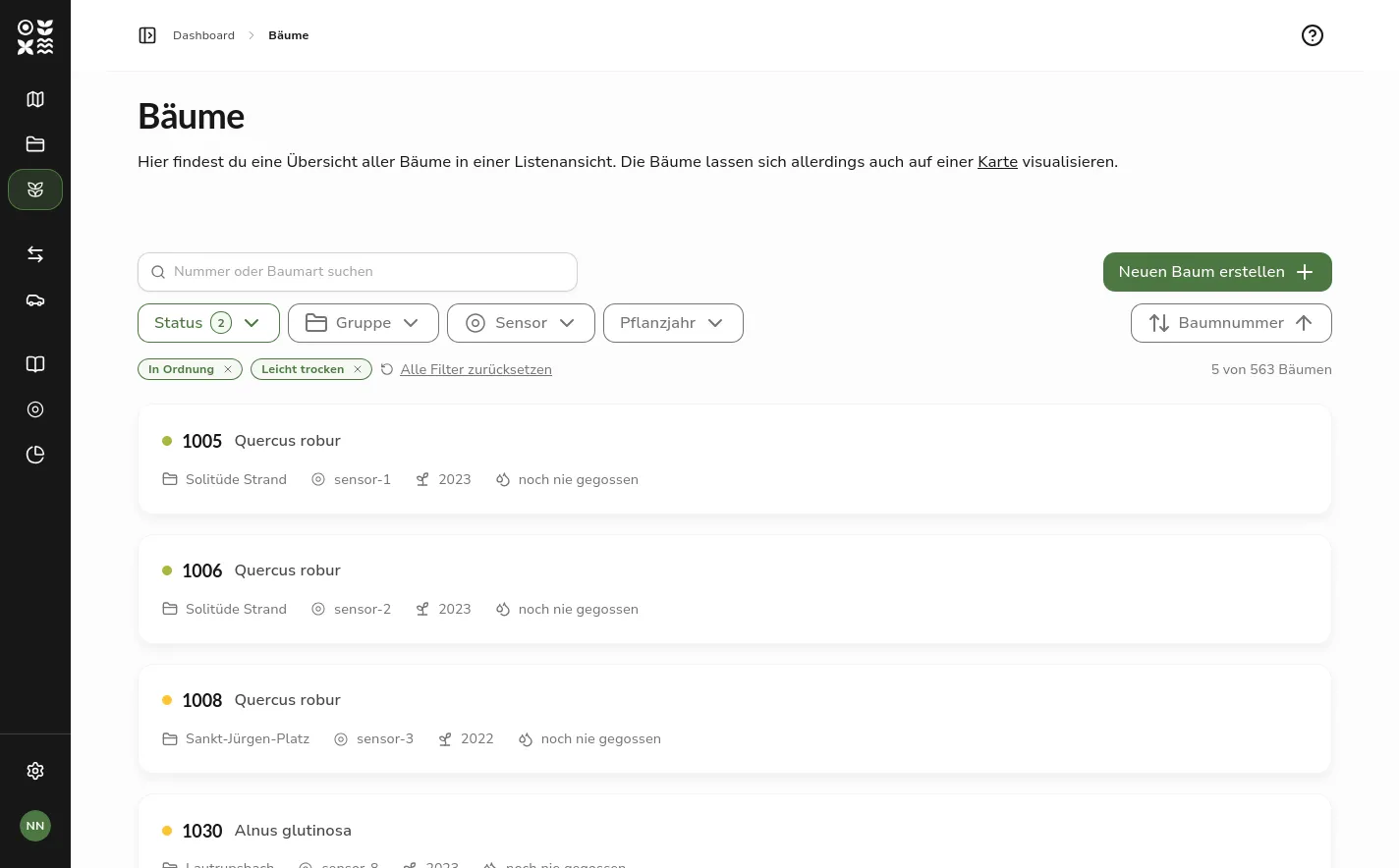 The tree list with its search field, filter row, two active filter chips and the result line reading 5 of 563 trees
The status of a vehicle
The status of a vehicle was a field in the form, and one of its values was on a run. Nobody set it when an irrigation schedule started or finished, so a vehicle stayed on a run until someone remembered to reset it by hand.
What is entered now is only the availability, the part a human genuinely knows, such as a stay in the workshop. Whether a vehicle is currently out is derived from the irrigation schedules: it counts as out for as long as it is assigned to an irrigation schedule with the status active. Not available takes precedence over a running schedule, because whoever sends a vehicle to the workshop knows more than a schedule someone forgot to close.
The irrigation schedule board
An irrigation schedule started by mistake could not be pulled back on the board. The planned column dimmed as soon as a card was dragged out of the active one, and the correction ran through the status dialog or the undo toast while it was still up. The card can now be dragged back into the planned column, which shows the hint about reverting the start while doing so.
The status unknown has disappeared from schedule planning. It was the zero value of the earlier implementation and not a state a schedule ever reached, yet it made itself felt in the interface: it served as the fallback for an unrecognised status, led to a status dialog with nothing to choose from, and made the affected card vanish from the board.
Fixed Bugs
Map
Content in the map panel could run out of the white area as soon as several validation messages made it longer. What it hit was the save button of all things, which could then no longer be reached. The panel now scrolls inside its frame, and the header with the close button stays put. In the selection list for trees and groups the growing area also has a floor now, so it no longer collapses to nothing.
Handbook download
In the installed app, the handbook download delivered a page of the application under the file name of the PDF. The cache of the installed app answered the request itself instead of passing it on to the server. The handbook download now always goes to the server.
Error page
On the error page the cable illustration ran right through the text, with the plug floating in the middle of the screen. It now sits above the text, and its height is capped on tall windows.
Outlook
The handbook is available in German only for now. On an interface set to English the chapters therefore appear in German, with a note above saying so. The translation is the next step.
For plugins a third mode is prepared but not yet selectable: a view that runs internally only and is proxied by Green Ecolution. Until then either a publicly reachable address can be given, or no view at all.
Sharing individual resources with sub-organizations, mentioned in the outlook of 0.6.0, is still pending. It remains the next larger step for the permission model, so that a contracted company can look after a stock of trees without it being transferred to them.
Feedback and bug reports are always welcome on GitHub.
Found an error or have feedback on this release? Create an issue →